
CASE STUDY
SPARC - Website Redesign and Mobile Prototype (Client Project)

TIME
2 weeks
TEAM
4 members
MY ROLE
UX Designer
Visual Designer
Prototype Lead
User Researcher
Prototyping & Testing
TOOLS
Figma
Miro
Trello
Illustrator
SPARC's mission to provide the resources, progressive programs and community education inspired us especially because it is the first and only no-kill animal shelter
in that County
Challenge:
Santa Paula Animal Rescue Center's (SPARC) is an animal rescue center whose website had a complexed information architecture which led to a clunky navigation. The key tasks of adopting, donating, volunteering, and attaining contact info for the center have been made difficult from the overloading of text and information, inconsistent content placement, and decentralized application processes.
Goal:
An overall visual revamp for the site to become more engaging for the user and a streamlining of its key functionalities to:
1. Increase the number of their pet adoptions
2. Gather maximum amount of donations for it to continue helping the animals
3. Get more number of volunteers

Research
& Problem Definition
Key focus areas of research
To discover user’s pain points while adopting/rescuing a pet
To understand what users would improve about the process of adoption, donation and volunteer
Heuristic Analysis and Red-Line Annotation:
We began by conducting a heuristic analysis of the existing website to evaluate its strengths and weaknesses. While there was a lot to appreciate, we highlighted some of the areas the website needed help with, some of which are displayed in the images below with the help of red-line annotations.

Speaking with User and Conducting Usability Tests
I conducted 2 out of 5 interviews which also consisted of a few tasks for the
user to test the existing website.
Interview Objectives
-
To discover user's pain points while adopting or rescuing a pet
-
To understand what the users would improve about the process
-
To find out how many users volunteer or donate to their rescue center
Usability Testing Tasks
-
To go through the cat adoption process
-
To make a general donation
-
To find out information about volunteering
-
To locate hours and address of the center
-
To learn about the Bungalow Sponsorship


“The story of my cat was very important for me and that is what convinced me to get that specific cat.”
“The number of adoptions has increased during this time and we have to run our adoption events and programs online”
Challenges
Motivation
Websites are outdated
Limited resources leave animals in tight spaces
Fewer online options
"I wish I knew not to leave treats around dogs"
Unsure about the status of the adoption pet
"Wish the center provided more information"
"1st time adopting so didn't have enough knowledge"
Centers are not funded enough
Pictures were different than the actual pet
"I didn't know how important it is to neuter my pet"
Process of adoption can be lengthy
Pet insurance
"Rescuing is better than buying"
Feels better to rescue than to by from a breeder
"Worried they would put down the pet"
Owning a pet with partner
Rescue animals need help
Companionship
Features
Virtual meetup with pets
Applications
should be online
Accessible information about pet
What was the feedback?
Affinity Diagram
After conducting the user interviews and the usability tests the collected data was then divided into 8 categories. The categories which we focused on include “Features”, “Motivation” and “Challenges”.
Outdated
Users found the website outdated and text heavy.
Overwhelmed
Too much information can be distracting and the user found the adoption process too overwhelming.
Rescue/Adopt
User believes that rescuing/adopting a pet from centers is much better than buying a pet from a breeder
Inform
Lack of knowledge about taking care of the pet especially for the new pet owners
SPARC Survey
9 questions were included in the survey and sent out to gather quantitative data to support our previously done qualitative research. This survey was filled out by 25 respondents.
Key Insight:

User Persona

Competitive Analysis
Next step was to identify 5 competitors overall, out of which I focused on Shelby Shelter, our direct competitor, and Golden Meadows, one of the indirect competitors. A few elements we took note of were Shelby Shelter's clear transparent visuals conveying impact of donations as well as their attention-grabbing donate button and Golden Meadows's easy navigation and overall organized information.
The image below shows the strengths and weaknesses of the two competitors.
Click image to enlarge.

Ideate & Brainstorming
Let's Brainstorm!
After analyzing the affinity diagram, we conducted a fast-paced brainstorming session as a team to come up with ideas for our redesign. I then created a feature prioritization matrix to sort our ideas based on value provided to the user and the effort required for SPARC to implement the change. The larger area of focus revolved around high impact and low complexity section which include features such as:
-
Transparency about how the donation money is used
-
Intuitive adoption process and checklist
-
Regularly updated information about the adoptable pets
Click image to enlarge.


Storyboard
The user story was communicated through a storyboard to express how it would play out from a user’s perspective.

The Redesign Process
Card Sorting:
Along with another team member, I ran open-method card sorting sessions with two different individuals. I used this technique to determine which categories should stay, be relocated or be eliminated. Both users had the feedback to condense down the primary categories and combine similar sub-categories together. The users also felt that "Buddha Buddy" on its own lacked context.
Internal Feedback:
The card sorting session was observed by the entire team and with mutual decisions, a collective sitemap was formed.
Images below display the Card Sorting arrangement and Sitemap.
Click image to enlarge.

Card Sorting (Open method)

Sitemap - Navigation Bar
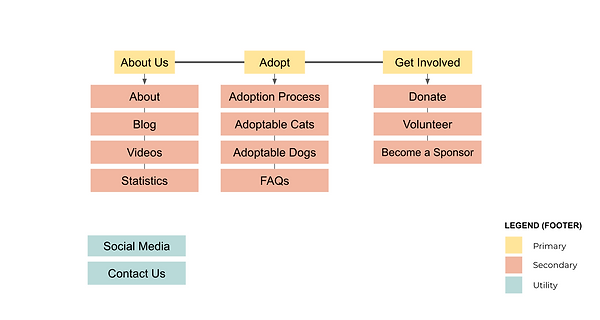
Sitemap - Footer
We designed 3 main user flows:
1. Adopt
2. Donate
3. Volunteer
Userflow


Wireframing & Prototyping

Developing Layouts and Formulating
Based on the data collected during the research, the design focused on simple navigation and easy access for users to donate to the organization. I developed the design with sketching the wireframes which are shown above.
By combining elements from each group member's sketches, we developed the Lo-Fi wireframes shown below.
Click to enlarge the image below.


Testing & Iterating
Guerilla Testing and Iterations
Four users performed three tasks to test the website prototype:
1. Find Buddha Buddy
2. Select and adopt a cat
3. Fill out the volunteer application
While all users completed each task, the design was further reformed to simplify the layout and navigation for the hi-fidelity prototype.

Mobile Hi-Fi Wireframes


Hi Fidelity Wireframes and Testing
My team and I came together to design the hi-fi wireframes. I carefully selected the images appropriate for each page and simplified the information for the users to find and complete the tasks smoothly. Four users tested the hi-fi prototype and were asked to complete these following tasks:
1. Go through the cat adoption process
2. Learn about the Buddha Buddy Program
3. Make a donation from the Buddha Buddy page
4. Gather information about volunteering
5. Locate hours and address of the center


Conclusion:
User Response:
There are still many parts of the design which needs to be explored. Overall, the takeaways from the user testing was positive and users completed all tasks successfully. Some important feedback included:
-
Fixed donation button is distracting on few pages
-
Confusing name of "Cat Adoption" page
-
Colored text could be avoided
SPARC's Response:
The organization was highly impressed with our final product and found the structure and functionality of the website very well thought out. They were also extremely pleased to hear the positive feedback from the users and appreciated the mobile prototype as well.

Future Steps:
Based on the feedback received from both the users and SPARC, following are some of the next steps we want to focus on.